So after much thought, I decided to make this file to save both parties much stress. This file simply allows you to port any A+ rom I have made to your phone. Its simple but let me put number so that It'll look official.
1. Download the porter HERE
2. Download any of the A+ roms you want from my blog (please note that whatever bugs it has on the A+ will also be on the A2 so check the comments and reviews especially on nairaland)
3. Make a backup of your rom with CWM (please this is a very important step)
4. Flash the A+ rom to your device (remember to wipe data/factory reset before flashing)
5. Flash the porter
6. Reboot
7* This isn't expected to happen but if your device is stuck at the boot logo (aka doesn't boot) just remove your battery and put it back. then boot into CWM again and go to backup and restore. Now select advanced restore and choose the most recent backup (which should be the one you made at step 3. Shey I told you it was important abi?) and select restore boot. Once that is done, reboot again. It should boot just fine now.
Kit Kat is still far off o. The apps work but the framework has refused to boot so please be patient. Thanks for your time. Happy Porting
Monday, January 20, 2014

Wednesday, December 11, 2013
Unbricking Phantom A
Unbricking Tecno A
Ok so you rooted and installed apps and somehow and someway you managed to brick your device...lets fix it.
FILES
First of all, here are the files you will need:
1. Stock rom for phantom A: Here and get the flash files here
2. Specific flashtool that works on A: Here
3. Drivers for the A: Here (I would advice that you uninstall any previous drivers for any tecno you have installed as they might cause a conflict. here is a way to test if your drivers are working properly. with the phone off, open your computers device manager and plug the phone. you should see "mediatek preloader..." come up for about 5 seconds and disappear. if it shows with a yellow arrow on it then the drivers are not installed correctly. if it doesnt have the yellow arrow then you are good to go.)
DISCLAIMER: Follow THESE instructions and Download THESE files for TECNO PHANTOM A only. I will not be held for any mishap caused by instructions followed from somewhere else.
HOW TO FLASH:
1. now open the folder where u downloaded d files to (everything must be in d same folder o) and cut the scatter file out and paste it in anoda place (anywhere. just make sure its not in d same folder as the other files).
open sp flash tools and use d file tab to load DAT scatter file.
2. now it should show you a list of things to flash. untick everything except recovery, boot and system (that means only these 3 should be ticked o). now double click on d word recovery and select d recovery you downloaded there. please make sure everything is in d same folder o.
do the same for the boot and system image u downloaded.
3. remove the bat3 from the bricked or unhappy A. click download in sp flash tools and plug d bricked f7. flashing will begin and when it ends you should see a green circle. if it doesnt start den remove and plug again. if you try three times and it doesnt flash den u didnt install the drivers correctly.
4.if you see the green circle then congrats you have successfully flashed your phone. now please first things first, after you finish patting yourself on the back about what a wonderful guru you are. put off the phone and wait for it to vibrate. the hold the volume up button and press and hold the power button until it shows you three options. use the volume button to navigate to recovery mode and use the volume down button to select it. cwm should boot. now please backup your phone.
thank you guys...its been a pleasure.
If You have any questions, place a comment here.
FILES
First of all, here are the files you will need:
1. Stock rom for phantom A: Here and get the flash files here
2. Specific flashtool that works on A: Here
3. Drivers for the A: Here (I would advice that you uninstall any previous drivers for any tecno you have installed as they might cause a conflict. here is a way to test if your drivers are working properly. with the phone off, open your computers device manager and plug the phone. you should see "mediatek preloader..." come up for about 5 seconds and disappear. if it shows with a yellow arrow on it then the drivers are not installed correctly. if it doesnt have the yellow arrow then you are good to go.)
DISCLAIMER: Follow THESE instructions and Download THESE files for TECNO PHANTOM A only. I will not be held for any mishap caused by instructions followed from somewhere else.
HOW TO FLASH:
1. now open the folder where u downloaded d files to (everything must be in d same folder o) and cut the scatter file out and paste it in anoda place (anywhere. just make sure its not in d same folder as the other files).
open sp flash tools and use d file tab to load DAT scatter file.
2. now it should show you a list of things to flash. untick everything except recovery, boot and system (that means only these 3 should be ticked o). now double click on d word recovery and select d recovery you downloaded there. please make sure everything is in d same folder o.
do the same for the boot and system image u downloaded.
3. remove the bat3 from the bricked or unhappy A. click download in sp flash tools and plug d bricked f7. flashing will begin and when it ends you should see a green circle. if it doesnt start den remove and plug again. if you try three times and it doesnt flash den u didnt install the drivers correctly.
4.if you see the green circle then congrats you have successfully flashed your phone. now please first things first, after you finish patting yourself on the back about what a wonderful guru you are. put off the phone and wait for it to vibrate. the hold the volume up button and press and hold the power button until it shows you three options. use the volume button to navigate to recovery mode and use the volume down button to select it. cwm should boot. now please backup your phone.
thank you guys...its been a pleasure.
If You have any questions, place a comment here.
Monday, December 2, 2013
Let's pretend
Let's pretend we cared and it all made sense
Let's believe we did our best and it all paid off
Because if we don't then we accept the blame
And are responsible for the broken glass
Let's pretend we actually voted
Pretend we got who we wanted
Because if we can't then the wolves come out
And we are left with sheep's clothing
Let's pretend it was our choice
Say we agreed to the policies
So we can say we have failed
And karma has paid
Let's pretend they had good lives
Nod our heads and say it was destiny
That way the bombs would be from God
And the blame not on us
Let's pretend we are all educated
And that our leaders are wise
And then we could Rest assured
We are represented outside as we should be
Let's pretend public officials were true
Let's assume they are misunderstood
That way we can join hands and search
For that elusive saboteur crippling us
Let's pretend this wasn't Nigeria
Let's call it an experiment
Little learned and little gained
Let's call it a day.
Monday, November 18, 2013
[CUSTOM ROM] Melting Rocks III for Tecno A+ and A2
Without too much talk, I give you version III. Remember, I am irresponsible.
This is an OS update so for all intents an purposes it would be like stock Samsung.
1) Download Melting Rocks III.zip File Here for A+ and here for A2
2) Put into External/Internal SD Card
3) Go To CMW Recovery
4) Wipe Data
5) Take a deep breath
6) Wipe System
7) Wipe Dalvik Cache
8) Select Install From SD (Internal or External)
9) Select Melting Rocks.zip And Select YES
10) select OK
11) Reboot Your System
12) Enjoy


 BTW Credit goes to Muntazir Abbas.
This is an OS update so for all intents an purposes it would be like stock Samsung.
1) Download Melting Rocks III.zip File Here for A+ and here for A2
2) Put into External/Internal SD Card
3) Go To CMW Recovery
4) Wipe Data
5) Take a deep breath
6) Wipe System
7) Wipe Dalvik Cache
8) Select Install From SD (Internal or External)
9) Select Melting Rocks.zip And Select YES
10) select OK
11) Reboot Your System
12) Enjoy
Saturday, November 16, 2013
Tecno A+: Fix IMEI invalid error
UPDATE::: Someone called me today to say the flashing steps weren't working. So this an alternative step to fix it. Note however that this fix is only temporary. If you perform a factory reset or flash a new ROM it will revert back and you will have to do it again. You will need a working A+ without the error to fix your own.
1. Download mtk droid tools. Yeah Google it.
2. Make sure you have adb drivers installed and that USB debugging is enabled on the working A+.
3. Plug the working A+ to the computer and wait for it to be detected by the program. Note that if the program fails to correctly detect the phone then step 2 must be done again.
4. Once connected, you should see the root button. Click on it to root the phone. Note that wether or not you have rooted before you still need to perform this step. If you have superuser or super su installed you will need to click grant on your phone for the rooting to work.
5. Now you should see a notification that root access has been granted. Now click on the IMEI/NVRAM button and choose backup. This will create two files in the droid tools folder. The files will be stored inside a folder called BackupNVRAM.
6. Now plug the A+ you want to fix and perform 3 and 4 again.
7. Now click do step 5 but instead of clicking backup this time you click restore and select the file created for your phone. You will get two prompts so you select the two files created.
8. Final step. Get the pack of your phone or look behind the battery and copy out the IMEI no pasted there. Do step 5 and this time change the numbers there to the one for your phone or else you will have the same number as the other A+ which sometimes might cause problems. If you don't have access to yours u can just type a bunch of numbers or use an IMEI generator (yeah Google that too).
Thanks.
UPDATE::: Here is a video tutorial for those having issues with the flashing: WATCH
So in the past one month I have received numerous calls, emails, dm's and blog comments. All pointing to one issue: Seun, my phone is giving me imei error and not detecting my sim card.
So in the past one month I have received numerous calls, emails, dm's and blog comments. All pointing to one issue: Seun, my phone is giving me imei error and not detecting my sim card.
At first I didn't understand why this was happening and particularly with this particular phone until it happened to me.
I would like to take this opportunity to apologize for this error. It is caused by in correct flashing and while that is not my fault I should have provided advice for its eventuality.
I would like to take this opportunity to apologize for this error. It is caused by in correct flashing and while that is not my fault I should have provided advice for its eventuality.
Let's fix it. Here's what you will need:
1. Sp flash tools for a+ (get it from the unbricking post)
2. Adb drivers (use pda.net)
3. Mtk drivers (get it from the unbricking post)
4. Mtk DROID tools (Google it)
1. Sp flash tools for a+ (get it from the unbricking post)
2. Adb drivers (use pda.net)
3. Mtk drivers (get it from the unbricking post)
4. Mtk DROID tools (Google it)
It's really simple. I have modified the stock nvram partition to allow multiple imei numbers so you can flash it on your phone. Let's go
Download the nvram here
Download imei backup here
Download modded scatter file here
Now follow the procedure in the unbricking thread but use the modded scatter file instead of the default one.
Tick only nvram and point it to the nvram.bin you downloaded
Flash that and boot your phone again. It would recognize your sim cards now. But you will still have the invalid imei error.
Download mobile uncle tools from plays tore and install on your phone. Now open it and go to imei backup restore. Choose the first option. This will create a file imei.bak in your phone storage. Check your mem card of its not there.
Quit mobile uncle tools and overwrite the imei.bak file with the one you downloaded.
Open mobile uncle tools again and go back to the backup tab and chose restore. It will ask to restart your phone.
Now you have imei but not the one for your phone. You can leave it like that if you like.
If you want your own unique imei though you can use Mtk DROID tools to change it. You will find your imei behind your battery or on the carton of your phone.
Thank you for your time. Happy flashing.
UPDATE!!!
For those of you getting errors when trying to flash, its becasue tecno recently changed the partition layout of their phones...don't know why. So this is a fix for that. Go to the unbricking thread and download all the files there (just as if you had bricked your phone) then follow the instructions there. The only difference are:
1. You have to format the phone with spflash tools before you flash. Load the scatter file in this post first.
2. After formatting, you now need to flash the phone brand new again. and this time you have to load all the files when flashing. I think for this I'll make a video. But if you get the idea you can go ahead and try.
Wednesday, October 23, 2013
[CUSTOM ROM] UI of LIFE IV
UPDATE 18-12-13: I Skipped uploading III because IV was drawing close.
Please I recommend this rom. Its beautiful and it is stable as well as being optimized for gaming and everyday use.
Download Here:
I've been away for some reasons I'm not about to tell you but this not just a hobby....its...well...I'm back sha.
Its updated and awesome and stable. 99% bug free. Lets see what we have here:
LATEST VERSION V2
* MIUI V 3.10.11
* Full dual sim support
* Fast, smooth, stable
* 3G active sim card switch
* Hidden Carrier Names
* Some layouts fixes.
* New Icons
* Front camera videorecording!
* 2G/3G toggle fixed
* EngineerMode built-in
Download HERE
===================
From here its the usual
Just in case though, here is how to install:
BACKUP YOUR APPS AND DATA FIRST (
download the rom
--reboot into recovery
navigate to the downloaded miui rom
wipe factory reset
select and flash it!
your done! and be sure to enjoy your new rom!
Note this will wipe your phone first so please remember to backup. you can use titanium backup for that.
Note also: this rom is like nothing you are used to. Addiction to it is highly likely.
Note also also: this is a custom rom. its not 100% so if something is not working as it should just mention it and i will try to fix it.
Thank you and have a nice day.
Features:
Based on official MIUI 4.2.2
Phone: Full Screen Caller ID with Auto Record Options
Messaging: Smart Auto Recipient
Network Assistant
Anti-Spam Manager
Virus Scan
ROM Backup and Restore
Password Settings
Complete Autostart Control
Permission Manager
Inbuilt Theme Engine with Theme Manager
Guard Mode
MiCloud Service with 10GB!!
MiSpace
MiTransfer
MiDownload Manager
MiUpdater
MiMusic
Unique Flip Styled Statusbar [Transparent]
Do Not Disturb Mode
Fast and Slim Launcher
And more than 200+ Functions
Here are some tips:
MIUI has its on market which unfortunately isnt in english. please flash the google apps after flashing the rom so install playstore. Flash from cwm the same way you flashed the rom.
The rom doesnt need to be rooted so please dont attempt it. you should see a folder named system. inside an app named permisions. open it and and click on root. switch on enable permission manager and yhe phone is rooted. switch it off to unroot (dont see why you would want that anyway)
Playstore might give you an error and ask you to download via wifi for files larger than 1MB. to change that open the system folder and open the downloads app. press menu and select settings. change the limit from there. it helps you control the amount of mb playstore eats.
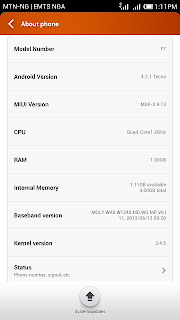
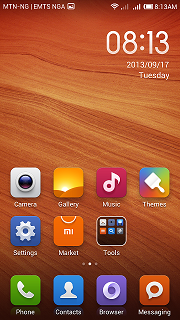
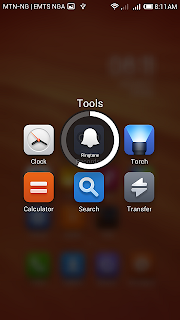
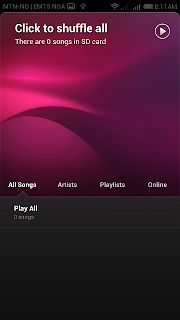

Please I recommend this rom. Its beautiful and it is stable as well as being optimized for gaming and everyday use.
Download Here:
I've been away for some reasons I'm not about to tell you but this not just a hobby....its...well...I'm back sha.
Its updated and awesome and stable. 99% bug free. Lets see what we have here:
LATEST VERSION V2
* MIUI V 3.10.11
* Full dual sim support
* Fast, smooth, stable
* 3G active sim card switch
* Hidden Carrier Names
* Some layouts fixes.
* New Icons
* Front camera videorecording!
* 2G/3G toggle fixed
* EngineerMode built-in
Download HERE
===================
From here its the usual
Just in case though, here is how to install:
BACKUP YOUR APPS AND DATA FIRST (
download the rom
--reboot into recovery
navigate to the downloaded miui rom
wipe factory reset
select and flash it!
your done! and be sure to enjoy your new rom!
Note this will wipe your phone first so please remember to backup. you can use titanium backup for that.
Note also: this rom is like nothing you are used to. Addiction to it is highly likely.
Note also also: this is a custom rom. its not 100% so if something is not working as it should just mention it and i will try to fix it.
Thank you and have a nice day.
Features:
Based on official MIUI 4.2.2
Phone: Full Screen Caller ID with Auto Record Options
Messaging: Smart Auto Recipient
Network Assistant
Anti-Spam Manager
Virus Scan
ROM Backup and Restore
Password Settings
Complete Autostart Control
Permission Manager
Inbuilt Theme Engine with Theme Manager
Guard Mode
MiCloud Service with 10GB!!
MiSpace
MiTransfer
MiDownload Manager
MiUpdater
MiMusic
Unique Flip Styled Statusbar [Transparent]
Do Not Disturb Mode
Fast and Slim Launcher
And more than 200+ Functions
Here are some tips:
MIUI has its on market which unfortunately isnt in english. please flash the google apps after flashing the rom so install playstore. Flash from cwm the same way you flashed the rom.
The rom doesnt need to be rooted so please dont attempt it. you should see a folder named system. inside an app named permisions. open it and and click on root. switch on enable permission manager and yhe phone is rooted. switch it off to unroot (dont see why you would want that anyway)
Playstore might give you an error and ask you to download via wifi for files larger than 1MB. to change that open the system folder and open the downloads app. press menu and select settings. change the limit from there. it helps you control the amount of mb playstore eats.


Tuesday, October 8, 2013
[CUSTOM ROM] Melting Rocks II for Tecno A+
Melting Rocks is still the most stable rom for the A+ but this rom looks even better. Here we go:


FEATURES
Samsung Galaxy S4 UI
Samsung Galaxy S4 Fonts
Samsung Galaxy S4 Dailer
Samsung Galaxy S4 Music
Samsung Galaxy S4 Alarms
Samsung Galaxy S4 Toggle
Samsung Galaxy S4 Sounds
Samsung Galaxy S4 Widgets
Samsung Galaxy S4 Bootlogo
Samsung Galaxy S4 Statusbar
Samsung Galaxy S4 Wallpaper
Samsung Galaxy S4 S Voice
Samsung Galaxy S4 Ringtones
Samsung Galaxy S4 UI Sounds
Samsung Galaxy S4 Notification
Samsung Galaxy S4 Lockscreen
Samsung Galaxy S4 Boot Sound
Samsung Galaxy S4 Framework
Samsung Galaxy S4 Battery Icon
Samsung Galaxy S4 Swipe to call
Samsung Galaxy S4 Voice Unlock
Samsung Galaxy S4 Task manager
Samsung Galaxy S4 Boot Animation
Samsung Galaxy S4 AccuWeather
Samsung Galaxy S4 Swipe to message
Samsung Galaxy S4 Suspension window
Samsung Galaxy S4 Touchwiz launcher(badge support)
Customized APPS
M Unlock
Busybox
Init.d Scripts
Pre-Rooted
Bump Feature
Super Smooth
Signal Tweaks
Battery Tweaks
Proximity Tweaks
Build.prop Tweaks
Faster Streaming
CM10.1 Calculator
Net Speed Tweaks
Performance Tweaks
Day Dream Launcher
Updated Google Play
No Delay In Making Call
Deodexed & Zipaligned
OG Youtube Downloader
Mobile Bravia Engine 3
Transparent Status Bar
Default External App Storage
Better Image & Audio Quality
Enables 270 Degree Rotation
Better Responsiveness & Speed
Air gestures-work only in gallery
Based on android 4.2.2
Keyboard with swipe support
13MP Camera-All Modes
XLoud
XBlast Tools
X4 Video Player
Xposed Additions
Xperia Motion Snap
Xposed Framework
Xposed Gravity Box
Xposed Icon Themer
Xposed App Settings
ViPER4Android FX
ViPER4Android XHIFI
Lockscreen Wallpaper Change Through Gravity Box
Samsung Galaxy S4 UI
Samsung Galaxy S4 Fonts
Samsung Galaxy S4 Dailer
Samsung Galaxy S4 Music
Samsung Galaxy S4 Alarms
Samsung Galaxy S4 Toggle
Samsung Galaxy S4 Sounds
Samsung Galaxy S4 Widgets
Samsung Galaxy S4 Bootlogo
Samsung Galaxy S4 Statusbar
Samsung Galaxy S4 Wallpaper
Samsung Galaxy S4 S Voice
Samsung Galaxy S4 Ringtones
Samsung Galaxy S4 UI Sounds
Samsung Galaxy S4 Notification
Samsung Galaxy S4 Lockscreen
Samsung Galaxy S4 Boot Sound
Samsung Galaxy S4 Framework
Samsung Galaxy S4 Battery Icon
Samsung Galaxy S4 Swipe to call
Samsung Galaxy S4 Voice Unlock
Samsung Galaxy S4 Task manager
Samsung Galaxy S4 Boot Animation
Samsung Galaxy S4 AccuWeather
Samsung Galaxy S4 Swipe to message
Samsung Galaxy S4 Suspension window
Samsung Galaxy S4 Touchwiz launcher(badge support)
Customized APPS
M Unlock
Busybox
Init.d Scripts
Pre-Rooted
Bump Feature
Super Smooth
Signal Tweaks
Battery Tweaks
Proximity Tweaks
Build.prop Tweaks
Faster Streaming
CM10.1 Calculator
Net Speed Tweaks
Performance Tweaks
Day Dream Launcher
Updated Google Play
No Delay In Making Call
Deodexed & Zipaligned
OG Youtube Downloader
Mobile Bravia Engine 3
Transparent Status Bar
Default External App Storage
Better Image & Audio Quality
Enables 270 Degree Rotation
Better Responsiveness & Speed
Air gestures-work only in gallery
Based on android 4.2.2
Keyboard with swipe support
13MP Camera-All Modes
XLoud
XBlast Tools
X4 Video Player
Xposed Additions
Xperia Motion Snap
Xposed Framework
Xposed Gravity Box
Xposed Icon Themer
Xposed App Settings
ViPER4Android FX
ViPER4Android XHIFI
Lockscreen Wallpaper Change Through Gravity Box
BUG!! Air gestures not working properly. Depends on how good your sensor is. Some how it seems to vary
NOTE :-Make CMW Backup for Reverting back to your old system
How To Flash :
1) Download Melting Rocks II.zip File and Calling Patch.zip both
2) Put into External/Internal SD Card
3) Go To CMW Recovery
4) Wipe Data/Factory Reset And Wipe Partition
5) From Advance Menu Do Dalvik CACHE Clear
6) Go in Mount And Storage select FORMAT SYSTEM
7) Select Intall From SD Card
8) Select Melting Rocks II.zip And Select YES
9) Reboot Your System
10)Again Go to CMW then Flash Calling Patch.zip
11)Reboot
12)Again Go to CWM and Wipe Data/Factory Reset And Wipe Partition
13)Reboot
14) Enjoy
Steps To Get S4 looks and Notification Panel
1)Launch the Xposed Installer and click on "Install/Update"
2)Go to Modules tab Tick on Gravity Box, Icon Themer,App Settings,X-Blast tools
3)Open X-Blast tools,click status bar,choose clock colour as white
4)Open Gravity Box,Go to statusbar tweaks then click Quicksettings management.
5)Click quicksetting tiles and tick all.
6)Click tiles per row and select 4.
7)Go back and click notification drawer style,select notification drawer background and then choose according to your choice.
8)Go back and click Media Tweaks and select all.
9)Go back and click About and Select Use holo dark theme.
10)CLICK FIRST TWO OPTION TO GO TO OFFICIAL THREAD OF GRAVITYBOX AND XPOSED FRAMEWORK AND PRESS THANKS FOR THIER WORK
REBOOT
Done!
DOWNLOAD ROM HERE
DOWNLOAD PATCH HERE
1) Download Melting Rocks II.zip File and Calling Patch.zip both
2) Put into External/Internal SD Card
3) Go To CMW Recovery
4) Wipe Data/Factory Reset And Wipe Partition
5) From Advance Menu Do Dalvik CACHE Clear
6) Go in Mount And Storage select FORMAT SYSTEM
7) Select Intall From SD Card
8) Select Melting Rocks II.zip And Select YES
9) Reboot Your System
10)Again Go to CMW then Flash Calling Patch.zip
11)Reboot
12)Again Go to CWM and Wipe Data/Factory Reset And Wipe Partition
13)Reboot
14) Enjoy
Steps To Get S4 looks and Notification Panel
1)Launch the Xposed Installer and click on "Install/Update"
2)Go to Modules tab Tick on Gravity Box, Icon Themer,App Settings,X-Blast tools
3)Open X-Blast tools,click status bar,choose clock colour as white
4)Open Gravity Box,Go to statusbar tweaks then click Quicksettings management.
5)Click quicksetting tiles and tick all.
6)Click tiles per row and select 4.
7)Go back and click notification drawer style,select notification drawer background and then choose according to your choice.
8)Go back and click Media Tweaks and select all.
9)Go back and click About and Select Use holo dark theme.
10)CLICK FIRST TWO OPTION TO GO TO OFFICIAL THREAD OF GRAVITYBOX AND XPOSED FRAMEWORK AND PRESS THANKS FOR THIER WORK
REBOOT
Done!
DOWNLOAD ROM HERE
DOWNLOAD PATCH HERE


Subscribe to:
Posts (Atom)